Blog

  • UGREEN Uno 65W 3-Port USB C Charger Adapter: A Practical Guide to GaN Fast Charging

    UGREEN Uno 65W 3-Port USB C Charger Adapter: A Practical Guide to GaN Fast Charging

    Modern technology has created a simple but increasingly common problem: people often have more devices than available charging adapters. A laptop, smartphone, tablet, wireless earbuds, smartwatch, gaming accessory, and other electronics may all need power throughout the day. Carrying a separate charger for every device can make a work bag or travel case unnecessarily heavy and complicated.

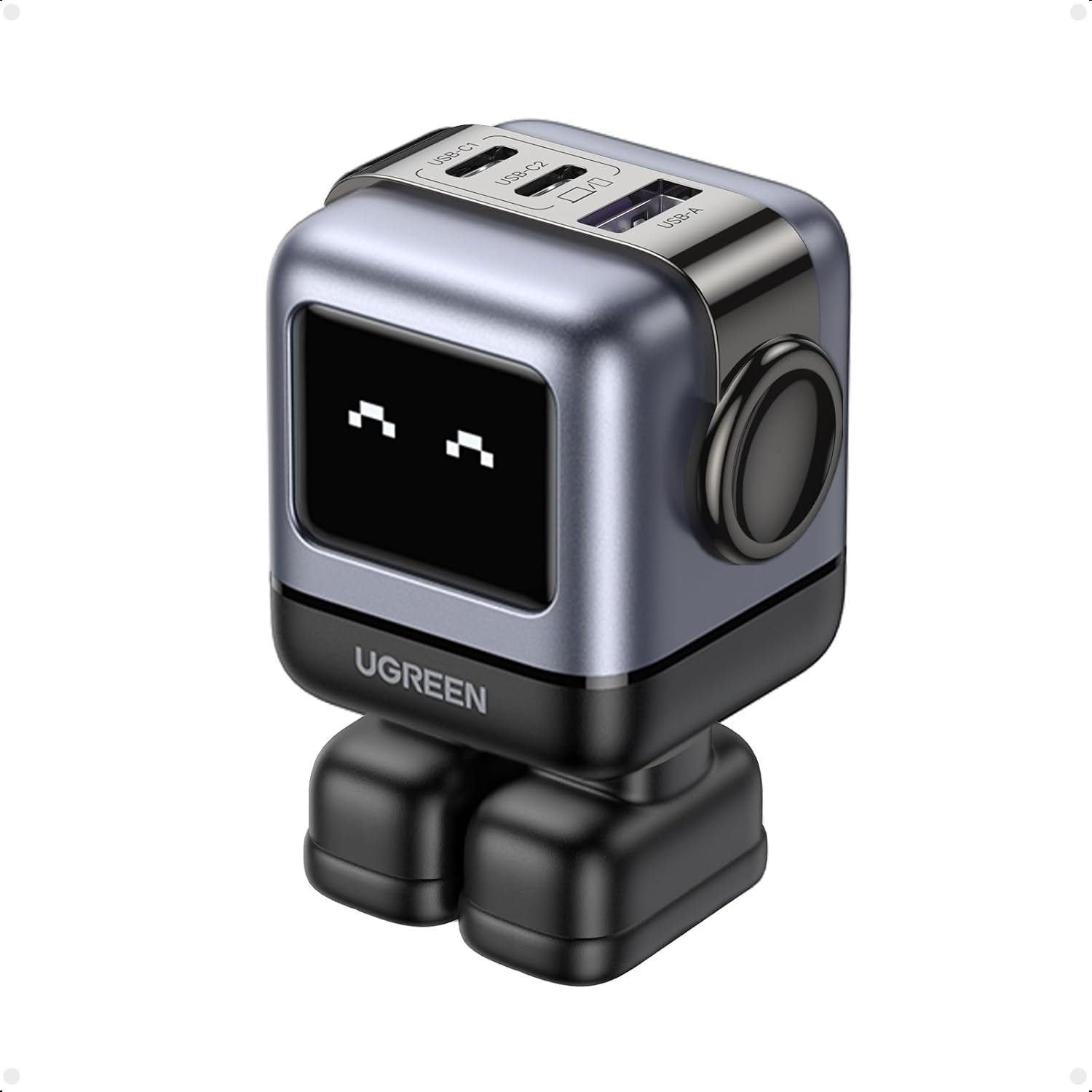
    The UGREEN Uno 65W 3-Port USB C Charger Adapter, GaN Fast Charging Block, Black is designed around the idea of consolidating charging into a single compact power adapter. With a total power rating of up to 65 watts and three USB-C ports, the charger is intended to provide a convenient way to power multiple compatible devices from one wall outlet.

    The use of GaN, or gallium nitride, technology is another important part of its design. GaN power electronics can allow manufacturers to create relatively compact chargers while maintaining high power-handling capabilities. This has contributed to the growing popularity of multi-port USB-C chargers for laptops, tablets, smartphones, and other USB-powered electronics.

    However, a 65W charger should not be viewed simply as a universal replacement for every power adapter. Actual charging speed depends on the device, cable, USB Power Delivery requirements, and how much power is available when multiple ports are being used at the same time.

    Understanding these factors can make it easier to determine how a charger such as the UGREEN Uno fits into a particular technology setup.

    What Is the UGREEN Uno 65W Charger?

    The UGREEN Uno 65W is a multi-port USB-C wall charger designed to provide power to compatible electronic devices.

    Its main characteristics include:

    • Up to 65W total charging power
    • Three USB-C ports
    • GaN charging technology
    • Compact wall-charger format
    • Black finish
    • Support for charging multiple compatible devices

    The three-port design is particularly relevant for people who regularly carry several USB-C devices.

    Instead of connecting multiple individual wall adapters to a power strip, a user can potentially connect several compatible devices to the same charging block.

    The actual amount of power delivered to each device depends on the charger’s power-management system and the requirements of the connected devices. When multiple devices are charging simultaneously, the available power may be distributed between the ports rather than providing the full 65W to every connected device.

    This distinction is important when evaluating any multi-port charger.

    Key Features

    65W Total Power Capacity

    The charger is rated for up to 65 watts of total power.

    A 65W power rating places this type of adapter above many basic phone chargers and makes it potentially useful for a broader range of USB-C devices.

    Smartphones generally require considerably less power than many laptops, while tablets and other devices can fall somewhere between the two.

    A 65W charger can therefore serve as a flexible power source for a mixed collection of electronics.

    However, the 65W figure represents the charger’s overall power capability rather than a promise that every connected device will receive 65W.

    The connected device determines how much power it can accept.

    For example, connecting a device designed to charge at a lower wattage will not cause the charger to force the full 65W into it. Compatible charging systems negotiate an appropriate power level.

    Three USB-C Ports

    The charger includes three USB-C ports.

    USB-C has become increasingly common across modern electronics because the connector can support power delivery as well as data and other functions depending on the device and implementation.

    Three USB-C charging ports can be useful for people who regularly need to power multiple devices at once.

    A typical setup might include a smartphone, tablet, and another USB-C device.

    A person working remotely might instead use the charger for a laptop, phone, and wireless accessory.

    The benefit of multiple ports becomes especially noticeable when traveling, where reducing the number of separate power adapters can simplify packing.

    It is important to remember that three ports do not necessarily mean three independent 65W outputs. The total power capacity remains subject to the charger’s overall 65W rating and its power-distribution design.

    GaN Technology

    GaN stands for gallium nitride.

    Traditional chargers have historically relied heavily on silicon-based semiconductor technology. GaN is a semiconductor material that can offer characteristics useful for high-frequency power conversion.

    In practical consumer chargers, GaN technology can help manufacturers create smaller and more efficient power adapters for certain power levels.

    That is one reason modern GaN chargers can provide relatively high power without requiring the bulky designs associated with some older high-wattage adapters.

    However, GaN does not mean that every GaN charger will have identical performance.

    The overall design still matters, including the power-management circuitry, thermal design, port configuration, efficiency, and safety features.

    Compact Charging Concept

    One of the main reasons people choose multi-port GaN chargers is convenience.

    A single charging block can potentially replace several individual USB-C adapters in a travel or workspace setup.

    The compact format can be particularly useful when electrical outlets are limited or when the user wants to reduce the amount of equipment carried in a bag.

    For example, someone traveling with a laptop, phone, tablet, and earbuds may prefer one multi-port adapter rather than several separate charging blocks.

    The exact physical dimensions and weight should be checked against the current product specifications if portability is a major consideration.

    Multi-Device Charging

    The three-port design makes simultaneous charging one of the key use cases.

    A user can connect several compatible devices to the charger at the same time rather than waiting for one device to finish before connecting another.

    The power available to each device can change when additional devices are connected.

    This is a normal characteristic of multi-port chargers.

    Someone charging a laptop alone may have access to more of the charger’s total power capacity than someone simultaneously charging a laptop, smartphone, and tablet.

    Understanding this behavior can prevent unrealistic expectations about charging speeds.

    Understanding 65W USB-C Charging

    Wattage is one of the most commonly mentioned specifications when discussing chargers, but it is only part of the charging equation.

    Electrical power can be expressed as:

    Power = Voltage × Current

    USB-C charging systems can operate at different voltage and current combinations depending on the supported charging standards and device requirements.

    A 65W charger has the ability to provide up to a certain total power level, but the connected device determines how much power it requests.

    This means that plugging a small smartphone into a 65W charger does not automatically make the phone charge at 65W.

    The phone may request a lower power level based on its battery, charging system, temperature, and supported charging protocols.

    Similarly, a laptop that requires more than the available charging capability may charge slowly, maintain its battery level, or potentially continue discharging under heavy workloads.

    For this reason, users should compare the charger specification with the requirements of their specific device.

    How It Can Be Used

    Charging a Laptop

    One of the most useful applications for a 65W USB-C charger is compatible laptops.

    Many modern laptops use USB-C charging, although requirements vary considerably between models.

    A laptop designed to accept USB-C Power Delivery at or below the charger’s available power can potentially use a charger in this category.

    This can be particularly convenient for remote work.

    Instead of carrying a proprietary laptop power brick along with a separate phone charger, a user may be able to use one USB-C adapter for several devices.

    However, laptop compatibility should always be confirmed before relying on a third-party charger as the primary power source.

    Some laptops require higher wattage, while others have proprietary charging requirements.

    Charging Smartphones

    Modern smartphones increasingly use USB-C connections.

    A 65W multi-port charger can provide a convenient charging source for compatible phones, although the actual charging speed depends on the phone’s supported charging technology.

    A charger having a higher maximum wattage than the phone requires does not automatically increase charging speed beyond the phone’s limits.

    The phone controls how much power it accepts within its supported charging system.

    This makes a high-wattage charger useful as a flexible power source rather than simply a way to maximize wattage.

    Charging Tablets

    Tablets can also be convenient candidates for a multi-port USB-C charger.

    A tablet may require more power than a typical smartphone but less than some laptops.

    A single charger can therefore potentially handle a tablet and other smaller devices at the same time, depending on the total power distribution.

    For households with several USB-C tablets and phones, multiple charging ports can also reduce the number of adapters occupying wall outlets.

    Charging Wireless Accessories

    Wireless earbuds, headphones, portable gaming accessories, smart devices, and other electronics often require relatively modest amounts of power.

    Using one multi-port charger for these devices can help simplify a workspace.

    For example, a user could connect a laptop to one port and use another port for a phone while charging a smaller accessory through the remaining connection.

    The exact charging compatibility of each accessory should still be verified.

    Home Office Setup

    A home office can quickly accumulate chargers.

    A laptop, phone, tablet, headphones, wireless mouse, portable monitor, and other accessories may all require USB power.

    A multi-port charger can help consolidate the charging area.

    Rather than having several individual adapters connected to a power strip, a user can potentially organize compatible devices around a single charging block.

    This can also make cable management easier.

    The charger itself does not eliminate cable clutter, but reducing the number of wall adapters can simplify the overall setup.

    Travel

    Travel is one of the strongest practical applications for a multi-port charger.

    A traveler may carry several devices but have access to only a small number of wall outlets.

    A three-port charger can allow multiple compatible devices to share one outlet.

    This can be particularly useful in hotel rooms, airports, coworking spaces, and other locations where outlets are limited.

    A compact GaN design can also reduce the amount of space occupied by the charging equipment in a travel bag.

    Travelers should still check electrical compatibility when traveling internationally and use appropriate plug adapters where required.

    Charging at a Shared Workspace

    People working in offices, libraries, cafés, and coworking spaces may appreciate having several charging ports available from one compact adapter.

    For example, a laptop and smartphone can potentially charge simultaneously.

    The main consideration is whether the combined power demand stays within the charger’s available output.

    Who It May Be Suitable For

    Laptop Users

    People who own compatible USB-C laptops may find a 65W charger useful as a compact alternative or secondary charger.

    It can be particularly convenient for keeping at an office, in a travel bag, or in another location away from the primary charging setup.

    Smartphone and Tablet Users

    People who carry several USB-C mobile devices can take advantage of the three-port configuration.

    Instead of using separate adapters for each device, compatible devices can share the same charging block.

    Remote Workers

    Remote workers often move between home offices, cafés, coworking spaces, and travel locations.

    A compact multi-port charger can simplify the equipment they carry.

    Students

    Students may carry laptops, smartphones, tablets, headphones, and other accessories.

    A multi-port charger can reduce the number of charging blocks required in a backpack.

    Travelers

    Travelers often prioritize compact accessories because every additional adapter adds weight and takes up space.

    A multi-port GaN charger can consolidate several charging needs into one device when the connected electronics are compatible.

    Technology Enthusiasts

    People with several USB-C devices may appreciate having a centralized charging solution.

    The value comes less from maximum wattage alone and more from the ability to manage multiple devices from a single power adapter.

    Important Things to Consider

    Check Your Device’s Required Wattage

    Before using a charger with a laptop or other higher-power device, check the original charger’s output requirements.

    If a laptop requires substantially more power than the charger can provide, the experience may not be what the user expects.

    A 65W charger is not a universal substitute for every laptop charger.

    For devices with higher power requirements, the original manufacturer adapter or a compatible charger with the required power capacity may be more appropriate.

    Understand Shared Power

    A 65W multi-port charger has a total power limit.

    If only one compatible device is connected, more of the available power can be allocated to that device.

    When multiple devices are connected, the charger must distribute its available power among them according to its internal power-management system.

    This means that charging performance can change when another device is plugged in.

    Someone charging a laptop and phone at the same time should not necessarily expect the laptop to receive the same power it would receive when connected alone.

    USB-C Does Not Guarantee Identical Charging

    The USB-C connector is standardized physically, but charging capabilities can vary.

    Different devices and cables can support different power levels and charging protocols.

    A USB-C cable may therefore become an important part of the charging setup.

    For higher-power applications, users should use cables appropriate for the required power level.

    The charger, cable, and device all contribute to the final charging experience.

    Cable Quality Matters

    A high-capacity charger cannot compensate for an unsuitable cable.

    USB-C cables can differ in their supported power and data capabilities.

    Users should select cables that are appropriately rated for the intended charging application.

    This is especially important when charging laptops or other devices that require higher power.

    Heat During Charging

    Power conversion produces heat.

    Chargers may become warm during operation, particularly when delivering substantial power for extended periods.

    Users should keep the charger in a reasonably ventilated location and avoid covering it with clothing, bedding, or other materials that could interfere with heat dissipation.

    Unusual overheating, damage, or abnormal behavior should not be ignored.

    GaN Does Not Mean No Heat

    GaN technology can contribute to efficient power conversion and compact charger designs, but it does not eliminate heat.

    Any device converting electrical power can generate heat.

    The charger should therefore be used according to the manufacturer’s operating instructions.

    Outlet Compatibility

    The physical plug and electrical specifications matter when traveling internationally.

    Electrical systems vary by country, including voltage, frequency, and outlet configuration.

    A plug adapter changes the physical connection but does not necessarily convert voltage.

    Travelers should confirm that their devices and charging equipment are suitable for the electrical system in their destination.

    Port Availability

    Three ports can be convenient, but users should think about how they actually charge their devices.

    If most of their devices still use USB-A connectors, a charger with only USB-C ports may require additional cables or adapters.

    For a USB-C-focused technology setup, however, three USB-C ports can simplify charging.

    Charging Is Not Always About Speed

    Fast charging can be useful, but it is not always necessary.

    A device may slow its charging rate as the battery approaches full capacity.

    Battery temperature, battery condition, software controls, and manufacturer charging strategies can also affect the actual charging rate.

    The charger provides power; the device manages how that power is used.

    Multi-Port USB-C Charger vs. Individual Chargers

    Using separate chargers for every device has one obvious advantage: each adapter is dedicated to a particular device.

    However, this can result in a crowded outlet and a heavier travel setup.

    A multi-port charger consolidates several charging functions into one block.

    The tradeoff is that the total power must be shared among connected devices.

    For someone who primarily charges one high-power laptop, a dedicated laptop charger may be sufficient.

    For someone who regularly charges several USB-C devices, a multi-port charger can be more convenient.

    GaN Charger vs. Traditional Silicon-Based Charger

    GaN chargers have become popular partly because gallium nitride power components can support efficient high-frequency switching in compact power designs.

    Traditional silicon-based chargers remain widely used and can work perfectly well for many applications.

    The distinction should not be reduced to the idea that GaN automatically makes a charger superior in every situation.

    The overall charger design matters.

    A well-designed charger must manage power conversion, heat, safety, port distribution, and compatibility regardless of the semiconductor material used.

    GaN is therefore best understood as an enabling technology that can contribute to compact charger designs.

    65W Charger vs. Higher-Wattage Chargers

    A 65W charger can be a practical middle ground for many users.

    It provides considerably more power than basic phone-focused adapters while remaining suitable for many smaller laptops and mobile devices.

    Higher-wattage chargers can be more appropriate for demanding laptops and other high-power equipment.

    However, a higher maximum wattage is not automatically more useful if the user’s devices do not require it.

    Someone carrying a phone, tablet, and lightweight laptop may find 65W sufficient.

    A user with a powerful laptop that requires significantly more power may need a charger designed for a higher output level.

    Creating a Simple Charging Setup

    A practical charging setup begins with identifying the devices that need power regularly.

    Make a list of the devices and note their charging requirements.

    For example:

    • Laptop
    • Smartphone
    • Tablet
    • Wireless headphones
    • Portable gaming device
    • Other USB-C accessories

    Then determine which devices can share a multi-port charger.

    A 65W charger can be particularly useful when the combined power requirements fit within its available capacity.

    Organizing cables by device can also make the setup easier to manage.

    Keeping one suitable cable with each frequently used device can reduce the temptation to use an inappropriate cable simply because it happens to be nearby.

    Charging While Traveling

    A multi-port charger can simplify travel, but preparation is still important.

    Before leaving, confirm:

    1. Which devices will be carried.
    2. Which devices use USB-C.
    3. Which cables are required.
    4. Which devices require higher charging power.
    5. Whether the destination uses a different outlet configuration.
    6. Whether a plug adapter is needed.
    7. Whether additional charging equipment is necessary.

    This simple checklist can prevent a compact charger from becoming the only missing item in an otherwise complete travel setup.

    Frequently Asked Questions

    What is the UGREEN Uno 65W charger?

    The UGREEN Uno 65W is a multi-port USB-C wall charger designed to provide up to 65W of total charging power across three USB-C ports.

    What does GaN mean?

    GaN stands for gallium nitride, a semiconductor material used in power electronics. In chargers, GaN technology can support compact and efficient power-conversion designs.

    Can the charger power a laptop?

    It can be suitable for compatible USB-C laptops whose charging requirements fall within the charger’s capabilities. Laptop compatibility and required wattage should always be checked before relying on it as the primary charger.

    Can it charge three devices at once?

    The charger has three USB-C ports, allowing multiple compatible devices to be connected simultaneously. The total available power is shared according to the charger’s power-distribution system.

    Does every device receive 65W?

    No. The 65W figure represents the charger’s total power capability rather than 65W being automatically delivered to every connected device.

    Can it charge a smartphone?

    Compatible USB-C smartphones can use the charger. The actual charging speed depends on the phone’s supported charging technology and the charger-device connection.

    Can it charge a tablet?

    Many USB-C tablets can be charged using a suitable USB-C power adapter. The actual charging requirements vary by tablet model.

    Can it replace my laptop’s original charger?

    That depends on the laptop. If the laptop supports USB-C charging and its requirements are compatible with the charger’s output, it may be suitable. Laptops requiring more power may need a higher-capacity charger.

    Does a 65W charger make every device charge faster?

    No. Charging speed is determined by the capabilities of the charger, cable, and device. A device cannot necessarily accept more power simply because a higher-capacity charger is connected.

    Do I need a special USB-C cable?

    The appropriate cable depends on the device and required charging power. For higher-power charging, use a cable designed to support the required power level.

    Can the charger be used while all three ports are occupied?

    The three USB-C ports are intended to support multiple connected devices, but the available power is distributed among them. Charging behavior can therefore change when additional devices are connected.

    Is GaN safer than traditional charging technology?

    GaN is a semiconductor technology used in power conversion. Safety depends on the complete charger design, including its electrical protection, thermal management, construction, and compliance with applicable standards.

    Can I use it while traveling internationally?

    The physical outlet configuration and electrical system of the destination should be checked before travel. A plug adapter may be required, and users should confirm electrical compatibility rather than assuming that a physical plug adapter converts voltage.

    Does the charger replace a power bank?

    No. A wall charger requires access to an electrical outlet. A power bank contains its own stored energy and can provide power away from an outlet.

    Is 65W enough for multiple devices?

    It depends on the devices being charged and their individual power requirements. A combination of smartphones, tablets, accessories, and compatible lower-power devices may fit comfortably within the available capacity, while multiple high-power devices may require more power.

    Can I leave the charger plugged in all the time?

    Users should follow the manufacturer’s recommendations. As a general practice, charging equipment should be kept in a suitable, ventilated location and inspected for damage or unusual behavior.

    Conclusion

    The UGREEN Uno 65W 3-Port USB C Charger Adapter is designed to address a common problem in modern technology setups: too many devices and not enough convenient charging connections.

    Its combination of 65W total power, three USB-C ports, and GaN technology makes it relevant to people who use several USB-C devices and want to consolidate their charging equipment.

    The three-port design can be particularly useful for combinations such as a laptop and smartphone, a tablet and accessories, or several smaller USB-C devices. The 65W capacity provides more flexibility than many basic phone chargers, while the compact GaN-oriented design can make the charger practical for desks, workspaces, and travel.

    At the same time, the most important consideration is not simply the 65W number. Charging performance depends on the entire system, including the device, cable, charging protocol, and number of devices connected simultaneously.

    Users should check their laptop and other high-power devices carefully before replacing an original charger. A device that requires more power than the charger can provide may not operate as intended while charging.

    It is also useful to remember that USB-C describes a connector and broader interface standard, not one universal charging speed. Different cables and devices can support different power levels.

    For people with a modern USB-C-focused setup, a multi-port GaN charger can simplify everyday charging by reducing the number of individual adapters needed. It can also make travel easier by combining several charging functions into one compact accessory.

    The best charging setup ultimately depends on the devices being used, their power requirements, and the way the user works or travels. By understanding those requirements before connecting everything to a single charger, users can make better use of a 65W multi-port power adapter while avoiding unrealistic expectations about charging speed.

    You can check more details on Amazon here.

  • Meta Quest 3S 128GB Virtual Reality Headset: A Practical Guide to VR, Gaming, and the Gorilla Tag Bundle

    Meta Quest 3S 128GB Virtual Reality Headset: A Practical Guide to VR, Gaming, and the Gorilla Tag Bundle

    Virtual reality has moved from being a specialized technology into a more accessible form of interactive entertainment. Modern standalone VR headsets can provide immersive games, social experiences, educational applications, fitness activities, and virtual environments without requiring a traditional gaming computer for every experience.

    The Meta Quest 3S 128GB is part of Meta’s standalone virtual reality headset lineup. Unlike older PC-dependent VR systems, a standalone headset combines the display, processors, sensors, speakers, controllers, and operating system into a single device. This allows users to experience compatible VR applications without connecting the headset to a separate computer for basic standalone use.

    The product discussed here is the Meta Quest 3S 128GB Virtual Reality Headset with a Gorilla Tag bundle. The bundle-oriented configuration makes it particularly relevant to people interested in social VR and active games, while the headset itself supports a much broader range of applications.

    Understanding what a VR headset actually does is useful before choosing one. A headset is not simply a screen placed close to the eyes. It tracks head movement, renders separate images for the user’s eyes, monitors physical movement, and allows interaction with virtual environments. Depending on the application, users may stand, walk within a defined play area, use hand tracking, operate controllers, or interact with other people online.

    This guide explores the Meta Quest 3S 128GB, its main features, possible uses, the role of the Gorilla Tag bundle, important considerations, and how standalone VR compares with other types of virtual reality systems.

    What Is the Meta Quest 3S?

    The Meta Quest 3S is a standalone VR headset designed for immersive virtual reality experiences.

    The device combines several technologies into one wearable system. Instead of relying on a separate console or gaming PC for every experience, the headset contains its own computing hardware and operating environment.

    This makes the Quest platform suitable for a wide range of users, from people discovering VR for the first time to users interested in games, social applications, exercise, entertainment, and other interactive experiences.

    The 128GB storage configuration provides internal space for applications, games, and other supported content. Storage capacity is an important consideration because standalone VR applications are installed directly on the headset rather than relying entirely on another computer.

    The exact amount of available storage can be lower than the advertised capacity because the operating system and required system software occupy part of the internal storage.

    Key Features

    Standalone Virtual Reality

    One of the most important characteristics of the Meta Quest 3S is its standalone operation.

    A standalone VR headset contains its own processor, storage, operating system, display system, sensors, and battery. Users can therefore access compatible experiences without having to connect the headset to a gaming computer for normal standalone use.

    This simplifies the setup compared with traditional PC-based VR systems.

    It also makes the headset easier to move between rooms or locations.

    Standalone operation does not mean that every possible VR application runs independently. Some experiences may have specific hardware, software, account, or connectivity requirements. Certain PC VR experiences can also be accessed through compatible connection methods when supported.

    The important point is that the basic Quest experience does not require a dedicated gaming PC.

    128GB Internal Storage

    The 128GB configuration provides internal storage for supported applications and content.

    Storage capacity becomes increasingly relevant as users build a larger VR library.

    A person who only installs a small number of games may find 128GB sufficient for their needs, while someone who regularly downloads larger applications may need to manage storage more actively.

    Standalone VR software can vary significantly in size.

    Users should therefore consider their expected library rather than assuming that every headset owner will use storage at the same rate.

    Because the Quest 3S does not use expandable internal storage in the same way as a conventional computer with an external drive, storage management is worth considering before installing a large number of applications.

    Immersive VR Display

    A VR headset uses separate visual information for the user’s left and right eyes to create a three-dimensional sense of depth.

    When the user moves their head, the virtual environment changes accordingly.

    This creates a stronger sense of presence than watching a conventional flat screen.

    The experience can vary depending on the application. Some games place the user inside a fully virtual environment, while other applications may combine virtual content with the physical surroundings.

    The visual experience also depends on factors such as lens position, headset fit, lighting, software optimization, and the user’s individual eyesight.

    Head and Controller Tracking

    Tracking is fundamental to modern VR.

    The headset monitors its position and orientation so that virtual objects remain aligned with the user’s movements.

    The included controllers can provide physical inputs for compatible games and applications.

    Depending on the software and circumstances, hand tracking can also allow users to interact without relying exclusively on physical controllers.

    Tracking makes VR feel interactive rather than simply displaying a prerecorded video.

    For example, turning the user’s head can change the direction of view, while moving a controller can influence an object inside a virtual environment.

    Mixed Reality Capabilities

    Modern Quest headsets are not limited to completely isolated virtual environments.

    The Quest 3S can use its cameras and sensors to support mixed-reality experiences that incorporate elements of the physical environment into virtual applications.

    This can create experiences in which digital objects appear to interact with the user’s real surroundings.

    Mixed reality is different from conventional VR.

    In fully immersive VR, the physical environment is largely replaced by a virtual one.

    In mixed reality, digital content can be layered over or integrated with an awareness of the surrounding physical space.

    This distinction expands the types of applications that can be developed for the platform.

    Wireless Design

    The headset is designed for wireless standalone use.

    This means users are not normally connected to a computer by a cable during standard standalone VR sessions.

    Wireless operation can provide greater freedom of movement, particularly for active applications.

    However, wireless VR does not eliminate all connectivity requirements. Some applications may require an internet connection, online accounts, downloads, updates, or multiplayer connectivity.

    The headset also relies on its internal battery, so session duration is influenced by battery capacity and usage conditions.

    Gorilla Tag Bundle

    The product listing identifies the headset as being packaged with a Gorilla Tag bundle.

    Gorilla Tag is a social VR game centered around movement-based gameplay and interaction with other players.

    The game’s distinctive movement system makes physical movement an important part of the experience.

    For someone purchasing the headset specifically because of Gorilla Tag, the bundled content can provide an immediate starting point for exploring this style of VR.

    However, the headset itself should not be viewed as a single-game device.

    The Quest platform supports a broad range of applications beyond Gorilla Tag, including games, creative tools, educational software, social experiences, fitness applications, entertainment, and other forms of interactive content.

    The exact bundle contents and promotional terms can change, so users should verify the current product listing for details about included digital content, redemption requirements, and eligibility.

    How It Can Be Used

    Playing VR Games

    Gaming is one of the most obvious applications for the Meta Quest 3S.

    Standalone VR games can place users inside virtual environments rather than simply showing the action on a television.

    Different games use different interaction systems.

    Some rely heavily on controllers, while others support hand tracking or movement-based interactions.

    Genres can include:

    • Action games
    • Adventure experiences
    • Puzzle games
    • Rhythm games
    • Simulation titles
    • Sports experiences
    • Social games
    • Exploration experiences
    • Educational games

    The variety means the headset can be used for much more than one particular game.

    Playing Gorilla Tag

    Gorilla Tag is particularly relevant to this bundle because its gameplay emphasizes physical movement.

    The game uses a distinctive locomotion system that allows players to move through virtual environments in a way that differs from conventional joystick-controlled movement.

    This can make the experience more physically active than many traditional seated VR games.

    Because the game encourages movement, users should make sure their play area is clear before starting.

    Furniture, walls, pets, cables, and other obstacles can create hazards when a person is immersed in a virtual environment.

    A suitable play space is therefore an important part of the experience.

    Social VR

    Virtual reality can also be used for social interaction.

    Depending on the application, users can communicate with other people through voice, avatars, gestures, or shared virtual environments.

    This can create experiences that feel different from conventional voice or video communication.

    Parents and guardians should pay attention to the social features available in VR applications, especially for younger users.

    Online communities can contain interactions with strangers, and individual applications may have different moderation and privacy controls.

    Fitness and Exercise

    VR can be physically active.

    Certain applications are designed around movement, rhythm, boxing-style activities, dancing, sports, or other forms of exercise.

    A VR headset can therefore become part of a home activity routine.

    However, VR exercise should not be treated as automatically safe for everyone.

    Users should choose activities appropriate to their physical condition, take breaks, stay hydrated, and stop if they experience pain, dizziness, unusual shortness of breath, or other concerning symptoms.

    The physical play area should also remain clear.

    Entertainment

    VR can provide immersive entertainment beyond conventional games.

    Depending on available applications, users may watch compatible media, explore virtual environments, attend social experiences, or interact with other forms of digital entertainment.

    The headset effectively creates a private visual environment around the user.

    This can be useful when the user wants an immersive experience without occupying a television screen.

    Education

    Virtual reality can also support educational experiences.

    Interactive applications may allow users to explore historical environments, scientific concepts, geography, anatomy, space, museums, and other subjects.

    The advantage of VR education is that abstract ideas can sometimes be represented spatially.

    Instead of only reading about an environment, the user may be able to explore a three-dimensional representation.

    The quality of the educational experience depends heavily on the individual application, so the headset should be considered a platform rather than a guarantee of educational content quality.

    Creative Applications

    VR can also be used for creative work.

    Depending on available software, users can experiment with three-dimensional drawing, virtual design, sculpting, animation, and other creative activities.

    This can be particularly interesting for people who want to understand spatial design in a more direct way.

    A VR controller can become an input tool rather than simply a game controller.

    Exploring Mixed Reality

    Mixed reality introduces another category of applications.

    Instead of completely replacing the physical environment, compatible applications can incorporate virtual elements into the room.

    This may allow users to interact with digital objects while remaining visually aware of their surroundings.

    For example, an application could place virtual objects around a room or use physical surfaces as part of an interactive experience.

    Mixed reality is still highly dependent on software, tracking conditions, and the physical environment.

    Who It May Be Suitable For

    People New to VR

    A standalone headset can be an approachable way for someone to enter the VR ecosystem because it does not require building or purchasing a dedicated gaming PC for basic use.

    Users can put on the headset, complete the setup process, and access compatible standalone applications.

    There is still a learning curve, particularly for people who have never used VR controls or spatial interfaces before.

    Families

    The Quest platform can provide a variety of entertainment options for households.

    However, families should pay attention to account management, age suitability, privacy, online interaction, play-space safety, and application content.

    Parents should also establish rules around session length and appropriate use.

    Gamers

    People who already enjoy video games may appreciate the different interaction model offered by VR.

    Instead of controlling a character entirely through a traditional gamepad, users may physically move their head, hands, or body within a virtual environment.

    This changes how games are designed and experienced.

    Social Gaming Enthusiasts

    People interested in multiplayer and social VR may find the platform particularly relevant.

    The Gorilla Tag bundle provides an example of how social and movement-based VR can become a central part of the experience.

    However, the broader Quest ecosystem includes many other social applications and multiplayer experiences.

    Fitness-Oriented Users

    People looking for interactive movement-based activities may find VR interesting as a supplement to other forms of exercise.

    The key word is supplement.

    VR should not automatically be considered a replacement for a balanced fitness routine.

    Creative and Educational Users

    The platform can also appeal to people interested in creative tools, interactive learning, visualization, and exploration.

    The available software ultimately determines how useful the headset becomes for these purposes.

    Important Things to Consider

    Physical Play Space

    One of the most important VR considerations is the environment around the user.

    When wearing a headset, the user may not have normal awareness of nearby physical objects.

    Before starting an active experience, clear the play area of:

    • Chairs
    • Tables
    • Cables
    • Toys
    • Pets
    • Fragile objects
    • Low furniture
    • Other obstacles

    Users should follow the headset’s boundary and safety guidance.

    For movement-heavy applications such as Gorilla Tag, this becomes especially important.

    Motion Discomfort

    Some people experience motion sickness, dizziness, eye strain, or discomfort when using VR.

    This can happen for several reasons, including visual motion that does not perfectly match physical movement.

    New users may benefit from shorter sessions and gradually increasing their time in VR.

    If discomfort develops, removing the headset and taking a break is generally appropriate.

    People who repeatedly experience significant symptoms should consider discussing the issue with an appropriate healthcare professional.

    Battery Life

    The Quest 3S operates using an internal battery.

    Battery duration varies according to usage conditions, software, display settings, wireless activity, and other factors.

    People planning longer sessions should be aware of the remaining charge and charging requirements.

    A headset with a depleted battery cannot provide the intended standalone experience until it is recharged.

    Storage Management

    The 128GB storage capacity is adequate for many users, but applications take up space.

    People who build large libraries may eventually need to uninstall applications they no longer use.

    Uninstalling an application does not necessarily mean permanently losing access to purchased content, depending on the platform and account system. Applications can generally be downloaded again when supported, although saved data and individual application behavior can vary.

    Internet and Account Requirements

    Many modern VR experiences involve online services.

    Users may need an account, internet access, application downloads, updates, or other online functionality.

    Offline functionality varies by application.

    Anyone purchasing a standalone VR headset should therefore understand that the device is part of a broader software ecosystem rather than an entirely offline gaming machine.

    Privacy

    VR headsets contain cameras and sensors that help understand the physical environment.

    This makes privacy an important consideration.

    Users should understand what permissions applications request and review privacy settings appropriately.

    When using social VR, it is also important to remember that communication may involve other people online.

    Families should discuss privacy and online interaction rules with younger users.

    Age and User Suitability

    VR experiences are not necessarily appropriate for every age group.

    Parents and guardians should review current manufacturer guidance and the requirements of individual applications.

    Age recommendations can differ between hardware platforms and software titles.

    Supervision may also be appropriate depending on the user’s age and experience.

    Prescription Glasses

    People who wear glasses should consider headset fit and compatibility.

    Some users may need appropriate adjustments or accessories depending on their prescription and the headset configuration.

    Users should follow the manufacturer’s guidance rather than forcing the headset into an uncomfortable position.

    Comfort can have a significant effect on the quality of a VR session.

    Audio

    VR experiences often rely on spatial audio to create a sense of direction.

    The headset’s audio system can contribute to immersion, but users should remain aware of their surroundings when appropriate.

    In shared spaces, headphones or alternative audio arrangements may be useful depending on the situation.

    Standalone VR vs. PC VR

    One of the major categories in virtual reality is the difference between standalone and PC-based systems.

    A standalone headset contains its own computing hardware.

    The Meta Quest 3S belongs primarily to this category.

    A PC VR system relies on a computer to provide much of the processing power required to render VR applications.

    PC VR can provide access to demanding applications and specialized software, but it also introduces additional hardware requirements.

    Standalone VR generally offers simpler setup and greater portability.

    PC VR can offer greater flexibility for users who already have powerful gaming computers and want to access compatible PC-based experiences.

    The appropriate category depends on the user’s priorities.

    Quest 3S vs. Traditional Gaming Consoles

    Traditional consoles connect to televisions or monitors.

    VR headsets create an individual visual environment directly around the user.

    A console is generally more suitable for shared-screen gaming, while VR is designed around individual immersion.

    This does not make one category universally superior.

    A household may use a conventional console for multiplayer games on a television and a VR headset for immersive individual experiences.

    The two categories can coexist rather than directly replace one another.

    VR Headset vs. Smartphone-Based VR

    Earlier consumer VR systems sometimes relied on smartphones inserted into inexpensive headsets.

    Modern standalone VR headsets are significantly more integrated.

    The headset contains dedicated processors, sensors, tracking systems, controllers, and software designed specifically for VR.

    This enables more sophisticated interaction than simply placing a smartphone in front of the user’s eyes.

    The Quest 3S therefore represents a more complete VR platform rather than a simple smartphone viewing accessory.

    VR Gaming vs. Traditional Gaming

    Traditional gaming typically uses a television or monitor and a controller, keyboard, or mouse.

    VR changes the relationship between the user and the game.

    The player can look around naturally, move their hands, and sometimes physically move through the play area.

    This can create stronger immersion but also introduces new responsibilities.

    A VR player needs physical space.

    They must consider motion comfort.

    They may need to manage battery life.

    They also need to remain aware of the physical environment.

    The different interaction model is one of VR’s defining characteristics.

    Making a VR Play Area Safer

    Before beginning an active VR session, users should inspect the room.

    Move furniture away from the intended play area where possible.

    Keep cables out of the movement zone.

    Make sure pets and children are not unexpectedly entering the space.

    Avoid using VR close to stairs or other locations where losing physical orientation could create a fall hazard.

    The virtual boundary system can provide an additional layer of awareness, but it should not be treated as a replacement for sensible room preparation.

    For active games, extra clearance is generally preferable.

    Building a Balanced VR Routine

    VR can be engaging enough that users may lose track of time.

    A balanced routine can help.

    Users can take regular breaks, especially during longer sessions.

    New users may benefit from shorter sessions while they become accustomed to the visual and physical characteristics of VR.

    Movement-heavy applications should be approached according to individual fitness levels.

    Keeping the headset, lenses, and surrounding area clean can also contribute to a more comfortable experience.

    Frequently Asked Questions

    What is the Meta Quest 3S 128GB?

    The Meta Quest 3S 128GB is a standalone virtual reality headset with 128GB of internal storage. It is designed to run compatible VR experiences without requiring a dedicated gaming PC for normal standalone use.

    What comes with the Gorilla Tag bundle?

    The product listing identifies this configuration as a Gorilla Tag bundle. The exact included digital content, redemption requirements, and promotional terms can vary, so buyers should verify the current listing details before purchase.

    Can the Quest 3S be used without a gaming PC?

    Yes. The headset is designed to operate as a standalone VR device, allowing compatible applications to run directly on the headset.

    Can it connect to a PC?

    The Quest platform can support compatible PC VR functionality through supported connection methods and software. Requirements vary depending on the PC, connection method, and application.

    What can 128GB of storage hold?

    Storage usage depends on the size of installed applications and other content. Smaller libraries may fit comfortably, while users with many large applications may need to manage storage over time.

    Is Gorilla Tag the only game available?

    No. Gorilla Tag is only one experience associated with the bundle. The Quest ecosystem includes many other compatible games, social applications, fitness experiences, educational programs, creative tools, and entertainment applications.

    Is the Meta Quest 3S suitable for exercise?

    Some compatible VR applications involve substantial physical movement and can be used as part of an active routine. Users should choose activities appropriate for their abilities, maintain a safe play area, and take breaks.

    Can children use the Quest 3S?

    Age suitability depends on current manufacturer guidance, application requirements, and parental considerations. Parents and guardians should review the latest recommendations and supervise younger users as appropriate.

    Can VR cause motion sickness?

    Some people experience motion discomfort, dizziness, or eye strain in VR. Shorter sessions, gradual adaptation, and choosing applications with comfortable movement systems can help some users, although individual responses vary.

    Does the Quest 3S require internet access?

    Internet requirements depend on the application and activity. Setup, downloads, updates, account functions, and online multiplayer may require internet connectivity.

    Can the headset be used for mixed reality?

    The Quest 3S supports compatible mixed-reality experiences that incorporate awareness of the physical environment into virtual applications.

    Does VR require a large room?

    Not every VR experience requires a large room. Seated and stationary applications can use relatively little space. Active experiences benefit from a larger, clear area.

    What should I do before playing an active VR game?

    Clear the surrounding area, remove obstacles, keep pets and other people away from the movement zone, and establish an appropriate play boundary.

    Can people who wear glasses use the headset?

    Many users who wear glasses can use VR headsets with appropriate fit and adjustment. Compatibility depends on the headset, frame dimensions, prescription, and available accessories.

    Is the Quest 3S a replacement for a gaming console?

    It serves a different purpose. A traditional console is designed around a television or monitor, while the Quest 3S provides immersive VR experiences directly through the headset.

    Conclusion

    The Meta Quest 3S 128GB provides a standalone approach to virtual reality that combines dedicated VR hardware, wireless operation, internal storage, motion tracking, controllers, and mixed-reality capabilities in one device.

    The 128GB configuration provides space for a collection of compatible applications, while the standalone design removes the need for a dedicated gaming PC for ordinary Quest experiences. The platform also extends beyond traditional gaming, with possibilities ranging from social VR and fitness to education, entertainment, creative applications, and mixed-reality experiences.

    The Gorilla Tag bundle adds a particular social and movement-oriented experience to the package, making it relevant to users interested in active multiplayer VR. At the same time, Gorilla Tag is only one part of the broader Quest ecosystem.

    Potential buyers should consider several practical factors before choosing a VR headset. Storage capacity, battery life, physical play space, motion comfort, privacy, internet requirements, age suitability, and software availability can all influence how useful the device becomes.

    The physical environment deserves particular attention. VR can make users less aware of objects around them, especially during active games. Clearing the play area and maintaining appropriate boundaries should be treated as an essential part of using the technology rather than an optional extra.

    It is also useful to approach VR with realistic expectations. A headset can provide immersive and interactive experiences, but individual comfort varies, software quality differs between applications, and many features depend on the surrounding software ecosystem.

    For people interested in exploring standalone virtual reality, social gaming, immersive entertainment, mixed reality, or interactive applications, the Meta Quest 3S provides a broad platform rather than a device limited to one particular type of content.

    You can check more details on Amazon here.